Convert PDF to HTML With Selectable Text (Scanned PDFs Too)
If text in your HTML is not selectable, the PDF is a scan and needs OCR. How to get real HTML text, what happens to images and layout, and the tools.
Updated
TL;DR
- Text is not selectable when the PDF is a scan: each page is a picture, so converters put a picture in the HTML.
- Fix it with OCR, which reads the picture and writes real text into the HTML.
- Pick one: HTML that looks like the page (pdf2htmlEX, Acrobat) or HTML that reads well on the web (headings, paragraphs, tables).
- Our free PDF to HTML tool runs OCR on scans and gives semantic HTML; images are not carried over.
If the text in your converted HTML cannot be selected, your PDF is almost certainly a scan: each page is an image, so the converter put an image in the HTML. To get selectable text you need OCR, which reads the page image and writes real text. After that, choose whether you want HTML that looks like the PDF page or HTML that reads like a web page.
This guide covers how to check your PDF, what OCR changes, what happens to images and layout, and the tools for each case.
Why the text is not selectable
A PDF can hold two very different things:
- A text PDF (exported from Word, InDesign, a browser) stores characters, fonts and positions. Converters copy that text into HTML, so you can select it.
- A scanned PDF (from a scanner, a phone app, a fax) stores a picture of each page. There are no characters inside, only pixels.
When you run a scanned PDF through a normal PDF to HTML converter, there is no text to copy. Most converters then render the page as a background image. The HTML looks right, but you cannot select, search, translate or index the text. Screen readers cannot read it either.
Some PDFs are mixed: a text cover page and scanned pages behind it, or a scan with a bad, invisible OCR layer added years ago. Those give HTML where some text selects and some does not, or selects as gibberish.
Check your PDF in 10 seconds
- Open the PDF and try to drag across a sentence. If the cursor draws a box instead of highlighting words, the page is an image.
- Press Ctrl+F (Cmd+F on a Mac) and search for a word you can see. No result means no text layer.
- On the command line, Poppler's
pdftotextprints the text layer:
pdftotext scan.pdf - | wc -c
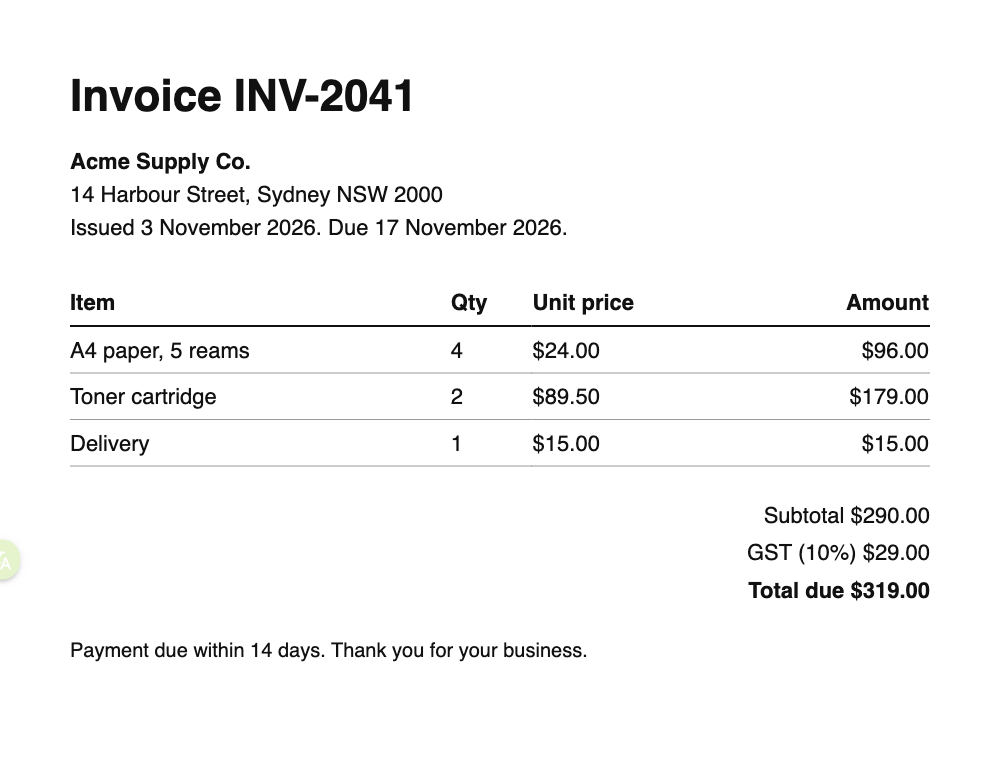
We made a one-page scanned PDF from our sample invoice on November 22, 2026. pdftotext returned a single page-break character and no text. That PDF needs OCR.
What OCR adds, and what it costs you
OCR reads the page image and produces characters. With them, the HTML has real text you can select, copy, search and translate, and that search engines can index.
Two things to keep in mind:
- Accuracy depends on the scan. Clean printed pages come out nearly perfect with modern models. Faint, skewed, low-resolution or handwritten pages produce more errors. Our guide to OCR accuracy shows what helps.
- OCR text is new text. A wrong digit in a price looks just as real as a right one. Read the numbers before you publish.
Two kinds of HTML: looks like the page, or reads like a web page
This choice matters more than the tool.
| Layout HTML | Semantic HTML | |
|---|---|---|
| What you get | Each line placed at its exact position, with the original fonts and images | Headings, paragraphs, lists and tables in reading order |
| Looks like the PDF | Yes | No; it uses your site's styles |
| Works on phones | Poorly; pages are fixed width | Yes |
| Good for SEO and accessibility | Weak | Strong |
| Keeps images | Yes | Depends on the tool |
| Typical tools | pdf2htmlEX, Acrobat export | OCRRouter, Markdown converters |
Pick layout HTML for magazines, brochures and anything where the look is the point. Pick semantic HTML to publish a report, manual or article on a website, move documents into a CMS, or feed them to search and AI tools.
Step by step: scanned PDF to HTML with our tool
Our free PDF to HTML tool produces semantic HTML and runs OCR on scanned pages automatically.
- Open the tool and drop your PDF on it. No sign-up for a few pages a day.
- Wait for the result. Each page is read with an OCR model, so scanned and text PDFs both work.
- Check the output. Headings become
h1toh6, body text becomesp, tables become realtableelements, and equations come back as LaTeX. - Download the HTML or copy the Markdown and paste it into your CMS or page template.
What it does not do: keep the images from the PDF, or copy the page design. Add figures to your page yourself, or use a layout tool (below) when you need both text and images.
For many files, use the API. This request reads a PDF and returns HTML:
curl https://api.ocrrouter.ai/v1/ocr \
  -H "Authorization: Bearer $OCRROUTER_API_KEY" \
  -H "Content-Type: application/json" \
  -d '{"model":"jina/jina-ocr","file_url":"https://example.com/scan.pdf","format":"html"}'
The HTML is in output.data. On our scanned invoice it returned this, in about 6 seconds, for 0 credits (Jina OCR is one of the free API models, up to 50,000 pages a month per account):
<section data-page="1">
<h1>Invoice INV-2041</h1>
<p>Acme Supply Co.<br>14 Harbour Street, Sydney NSW 2000<br>Issued 3 November 2026. Due 17 November 2026.</p>
<table>
<tr><th>Item</th><th>Qty</th><th>Unit price</th><th>Amount</th></tr>
<tr><td>A4 paper, 5 reams</td><td>4</td><td>$24.00</td><td>$96.00</td></tr>
...
</table>
</section>
Every word on that page was selectable text, and the table was a real HTML table.
Selectable text and images: the open-source route
When you need the page to look like the PDF, with images, and the PDF is a scan, do it in two steps:
- Add a text layer with OCRmyPDF. It runs Tesseract and writes invisible text under each page image:
ocrmypdf --deskew scan.pdf scan-ocr.pdf
- Convert with pdf2htmlEX. Its README describes "native HTML text with precise font and location", and it keeps images and backgrounds:
pdf2htmlEX scan-ocr.pdf
Things to know. pdf2htmlEX does not run OCR itself, so step 1 is required for scans. The output is fixed-layout HTML with absolute positions, so it does not reflow on phones. The text layer is only as good as Tesseract's reading of the page, which is fine on clean print and weak on photos and handwriting. Our make PDF searchable tool does step 1 online if you do not want to install OCRmyPDF.
Adobe Acrobat
Acrobat Pro can recognise text in scanned PDFs and export a PDF as an HTML web page. It is a reasonable choice if you already pay for it and convert a few files by hand. Expect layout-style HTML with inline styles that you will clean up before using it on a site. It is a paid desktop app, so it is less suited to batches or automation.
Which method should you use?
- One scanned PDF, publish on the web: our PDF to HTML tool.
- Many PDFs, into a CMS or pipeline: the API with
format: "html", or"markdown"if your CMS takes Markdown. - Must look exactly like the PDF, with images: OCRmyPDF, then pdf2htmlEX.
- Only need the text, not HTML: scanned PDF to text.
- Tables are what matter: see how to extract tables from a PDF.